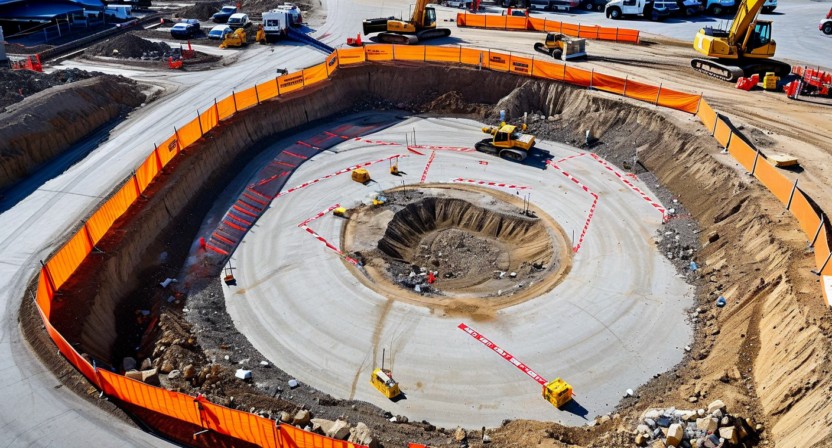
Every geo-fencing tutorial shows you how to draw a polygon and trigger an alert when a coordinate crosses the boundary. That's solved. What none of those tutorials mention is what happens when the polygon needs to change every 48 hours because the construction site underneath it is a different physical environment than it was two days ago.
Static geo-fencing on a construction site is marginally better than no geo-fencing. You get the first week right, and then the site evolves around your exclusion zones until they no longer correspond to actual hazard locations.
Why construction zones are fundamentally different
A retail geofence around a store location doesn't move. A perimeter around a warehouse yard changes when the company expands parking. A construction site exclusion zone changes every time a crane is repositioned, every time excavation extends in a new direction, every time temporary electrical panels are relocated, and every time scaffolding rises to a new elevation.
On a typical commercial construction project, crane positions are modified 3-7 times per project phase as the building rises. Each repositioning changes the swing radius — the circular danger zone around the crane that's hazardous during lift operations. A 200-ton crawler crane with a 200-foot boom has a swing radius of up to 210 feet. When it moves 50 feet north, the exclusion zone shifts accordingly. On a congested urban site, the new zone may overlap with work areas that were previously safe.
Excavation edges are equally dynamic. A basement foundation dig that starts at 20 feet deep and 100 feet wide can reach 40 feet deep and 200 feet wide within three weeks of active excavation. The fall protection perimeter — the zone where workers must be tied off or physically barriered — expands continuously throughout the excavation phase. A geo-fenced exclusion zone drawn on day one is undersized by day 22.
The zone management workflow
Our approach uses a three-layer zone model. The first layer is persistent zones: areas that are hazardous for the entire project duration, such as electrical transformer locations, permanent utility corridors, and areas under overhead power lines. These are drawn once during the initial site survey and reviewed monthly.
The second layer is phase zones: areas that are hazardous during a specific construction phase. Formwork areas, concrete pours, and steel erection zones fall into this category. Phase zones are activated at the start of a work activity and deactivated when the activity is complete. The site superintendent activates and deactivates these through the supervisor dashboard, typically as part of the daily site planning process.
The third layer is operational zones: crane swing radii, active equipment exclusion areas, and temporary utility exposures. These change most frequently — sometimes intra-day when a crane completes a lift sequence and the operator repositions. Operational zones are updated through a mobile app that lets the site foreman drag-to-resize a zone polygon in under 30 seconds. The updated zone boundary propagates to the edge server and all worker wearables within 8-12 seconds of the foreman's confirmation.
The crane swing radius calculation problem
Crane swing radius isn't simply the boom length. It's a function of boom length, load weight, radius-to-load, and applicable lift plan parameters. A crane operating at maximum rated capacity has a different safe working area than the same crane operating at 40% capacity on the same lift. ASME B30.5 and the crane's load chart specify the relationship, but translating that into a geo-fence polygon requires someone who understands the calculation.
Our platform includes a crane exclusion zone calculator that takes boom configuration, rated capacity, and current load percentage as inputs and outputs a geo-fence polygon automatically. For sites with Liebherr, Manitowoc, or Terex cranes (the most common on Gulf Coast commercial projects), we've pre-loaded the load chart data. The foreman enters the lift parameters before each major lift; the system calculates the exclusion zone and activates it. When the lift is complete, the foreman marks it done and the zone deactivates.
This is a workflow change, not just a technology change. It requires the site foreman to interact with the platform before crane operations rather than relying on physical barricades alone. In our pilot, it took approximately 3 weeks for foremen to consistently use the pre-lift zone activation workflow. The behavioral adoption curve is a real implementation cost that should be factored into any deployment plan.
How BLE sensors and camera zones work together
The geo-fencing alerting system uses two detection mechanisms that are cross-validated before triggering a priority alert. A worker's BLE wearable detects a zone boundary crossing based on trilateration from the BLE mesh anchor points installed around the site. Simultaneously, the overhead camera system checks whether the worker's tracked position in the camera coordinate system has entered the zone polygon.
Single-source detections — BLE only or camera only — generate a lower-priority notification. Dual-source detections — BLE boundary crossing confirmed by camera position in zone — generate a high-priority alert that triggers audible notification on the foreman's device and a direct BLE signal to the worker's wearable badge. The dual-confirmation requirement reduces false positives significantly: BLE trilateration on a dense site has 2-3 meter accuracy, which occasionally places a worker inside a zone polygon when they're physically standing just outside it. Camera confirmation eliminates most of these edge cases.
For areas outside camera coverage — particularly multi-level sites where camera angles can't cover all elevated work areas — BLE-only detection runs at a lower confidence threshold, generating alerts at 1.5 meters inside the zone boundary rather than at the boundary itself. That buffer compensates for the reduced positional accuracy when camera confirmation isn't available.
Zone versioning and audit trail
Every zone change is logged: who changed it, what they changed, and at what time. When a recordable incident occurs in or near a geo-fenced zone, the incident investigation record can pull the exact zone configuration that was active at the time of the incident — including which authority activated or deactivated the zone and when.
This matters for OSHA investigations. After a struck-by fatality, investigators want to know whether the exclusion zone was active, whether the victim's wearable was online, and whether any alerts fired before the incident. Our audit log provides all three in a single report. We've had two of our pilot sites tell us that this documentation capability alone justified the deployment cost — not because they expected incidents, but because the liability documentation value during an investigation is substantial.
The zone complexity limit
One operational constraint worth acknowledging: zone complexity creates alert fatigue. A site with 40 active zones, half of them changing daily, generates many zone breach events — some legitimate, many attributable to boundary positioning imprecision or brief transits through zones by authorized workers. We recommend a maximum of 15-20 active zones per site, with careful prioritization between the zone categories. High-priority zones — crane swing radii, excavation edges — trigger immediate audible alerts. Medium-priority zones — material staging areas, utility corridors — generate logged events without active alerting unless the worker remains in the zone for more than 30 seconds.
The zone priority framework is configurable per deployment. Getting the priority levels right for a specific site requires a conversation between the safety manager and the deployment team at the time of installation. It's not something that can be set with default values and forgotten — it requires site-specific judgment about which hazard types are most consequential for that project's phase and work activities.
For more on how our BLE sensor positioning supports zone enforcement, see our article on wearable sensors and BLE positioning accuracy. To discuss zone management for a specific site configuration, reach out at [email protected].